A couple of weeks ago Dave Airlie pointed out to me that Alex Deucher had added RENDER extension acceleration for R3xx/R5xx to the Radeon EXA driver. Seeing an opportunity to have a desktop that was both composited and accelerated on my R300 laptop, I tried it out. The initial results: everything slowed to a crawl. I fixed one problem that was causing a software fallback for gradients, and the next bottleneck was text. Less than 18,000 glyphs / second. I eventually tracked down the R300-specific problem, and that got things to a usable rate: 130,000 glyphs / second. But still, that’s slower than unaccelerated text. How can we make it fast?
To make sure that everybody is on the same page about what we are trying to make fast, let me show a picture of a drawing some text via the RENDER extension:

It’s a two step process: first we take all the glyph images and draw them onto a mask. Then we draw the source color or pattern through that mask onto the destination surface. So, which of the two steps is slow? We can get a very good idea of that by measuring the drawing speed as a function of the size of glyph and of the number of glyphs in the string.
|
R100 |
R300 |
i965 |
i965-BB |
| count |
10px |
24px |
10pt |
24px |
10px |
24px |
10px |
24px |
| 1 |
30300 |
30200 |
29400 |
29300 |
47500 |
47400 |
34500 |
34500 |
| 5 |
92900 |
90500 |
84500 |
81700 |
120000 |
119000 |
119000 |
119000 |
| 10 |
126000 |
111000 |
109000 |
108000 |
149000 |
148000 |
172000 |
172000 |
| 30 |
172000 |
127000 |
139000 |
138000 |
178000 |
178000 |
249000 |
238000 |
| 80 |
195000 |
130000 |
151000 |
151000 |
190000 |
190000 |
290000 |
278000 |
(Notes: All timings using EXA. R100/R300 timings on a P4-3.0Ghz, i965 timings on a core 2 dua 2.0Ghz. i965-BB is intel-batchbuffers branch, i965 master. Test program.)
We can also plot the numbers:
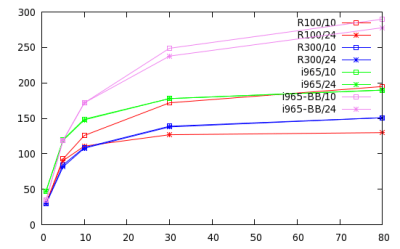
A couple of interesting things: first the amount of pixels we are pushing is completely irrelevant … on all the cards the 10 pixel and 24 pixel font sizes perform the same, even though there are almost 6 times as many pixels at the larger size (2.4^2 == 5.76.) Second, our performance in terms of glyphs/second is pretty much flat for all but the shortest strings. So we know what the bottleneck is: it’s the per-glyph setup cost of copying the glyphs onto the mask.
If we take a look at the EXA hooks for composite acceleration, we see the basic problem:
Bool (*PrepareComposite) (int                op,
                          PicturePtr         pSrcPicture,
                          PicturePtr         pMaskPicture,
                          PicturePtr         pDstPicture,
                          PixmapPtr          pSrc,
                          PixmapPtr          pMask,
                          PixmapPtr          pDst);

void  (*Composite)       (PixmapPtr         pDst,
                          int srcX,         int srcY,
                          int maskX,        int maskY,
                          int dstX,         int dstY,
                          int width,        int height);

void (*DoneComposite)    (PixmapPtr         pDst);
A composite operation consists of copying a number of rectangles from the same source, to the same destination, with the same operator. But in the building the mask, we are copying a number of rectangles from different sources. Each glyph must be added to the mask in a separate composite operation. And at the beginning and ends of a composite operation we do expensive stuff: at the beginning we set up all the state for the 3D engine. At the end we wait until the 3D engine is idle so we can go off and use the drawn result as a source for some other operation.
I had two thoughts initially: the first was to try and optimize separate composite operations done sequentially: if we do two operations in a row that need the 3D engine set up the same way, don’t set it up twice. The second was to extend the composite acceleration hooks so that we could change the source in the middle of an operation: to add a SwitchCompositeSource() that could be called between PrepareComposite() and DoneComposite(). But the first is tricky to get right if you want to avoid enough work to actually make a performance difference, and the second requires a minor version bump in EXA and is, beyond that, a hack. (Why just have an operation for switching the source, and not the operator or the mask.) Neither gets rid of the actual need to switch the source texture between every glyph: something that is inherently expensive to do for most graphics chipsets. (In the brave new world of the TTM memory manager, switching textures also means a lot of relocations for the submitted command buffer.)
Then Dave suggested something on IRC: what if instead of uploading each glyph into a separate glyph pixmap, we used a single glyph cache pixmap, uploaded glyphs there as needed, then composited to from that cache pixmap to the mask. That matches the current composite hooks perfectly, and allows us to set up the 3D engine once and just send a stream of vertices for each rectangle we want to draw to the card.
I took a stab at implementing the approach over the weekend and the results are definitely encouraging. Here’s the table and graph from above repeated with the new code:
|
R100 |
R300 |
i965 |
i965-BB |
| count |
10pt |
24pt |
10pt |
24pt |
10pt |
24pt |
10pt |
24pt |
| 1 |
31600 |
31100 |
30100 |
29300 |
48700 |
47900 |
34500 |
43500 |
| 5 |
137000 |
110000 |
131000 |
127000 |
198000 |
195000 |
153000 |
152000 |
| 10 |
229000 |
131000 |
222000 |
221000 |
322000 |
319000 |
269000 |
269000 |
| 30 |
438000 |
156000 |
435000 |
431000 |
558000 |
541000 |
549000 |
496000 |
| 80 |
611000 |
159000 |
620000 |
504000 |
727000 |
600000 |
762000 |
593000 |
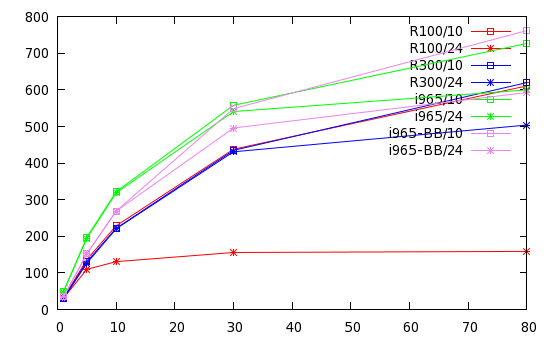
Obviously everything is much faster, but we also see a qualitative change: as compared to the previous numbers there is a much stronger dependence on the length of the glyph string (overall setup costs) and on the size of the glyphs (per-pixel costs.) We’ve taken the per-glyph setup cost mostly out of the equation. And at the larger glyph size the R100 starts falling way behind. It should be noted that there is significant overhead from my test code when we get to these speeds: ‘x11perf -aa10text’ is somewhat faster.
The code can be found in the glyph-cache branch of my xserver git tree at git://git.fishsoup.net/xserver. In an existing xserver git tree, you’d check out that branch as:
git remote add -f otaylor git://git.fishsoup.net/xserver
git checkout -b glyph-cache otaylor/glyph-cache
Web View.
What remains to be done? Well, first the current patch just uses static glyph cache size. The first time you draw an A8 glyph, you get a 300k pixmap allocated to hold 256 16×16 and 256 32×32 glyphs. The first time you draw a ARGB32 glyph (subpixel antialiasing) you get a 1.3M pixmap allocated. (4 times as big since each glyph is 4 times as big.) But 256 glyphs is not big enough for all languages. And immediately allocating 1.3M the first time we see an ARGB glyph is probably a bad idea, especially when memory is tight. A better approach would be to smart small, track the glyph cache hit rate, and at if we are getting a too low hit rate, dump the current cache, reallocate the cache to a larger size, and start over.
The second major thing left to do is to improve the way that glyphs are added to the cache pixmap. Right now, when a glyph is uploaded to the server by an application, it is immediately stored in a pixmap in video memory. With the glyph cache pixmap, it likely make more sense to keep the glyph in system memory until first needed, and then upload it directly to the glyph cache pixmap. I didn’t try to do that yet: what my patch does is simply copy directly from the in-memory glyph pixmap to the cache pixmap. So potential improvements from reducing the number of small pixmaps that must be memory managed are not yet achieved.


 fishsoup